



Loxone will recieve the spotmarket prices from our MYSQL Database in our server
- Holger Roswandowicz

- Jan 17, 2023
- 4 min read
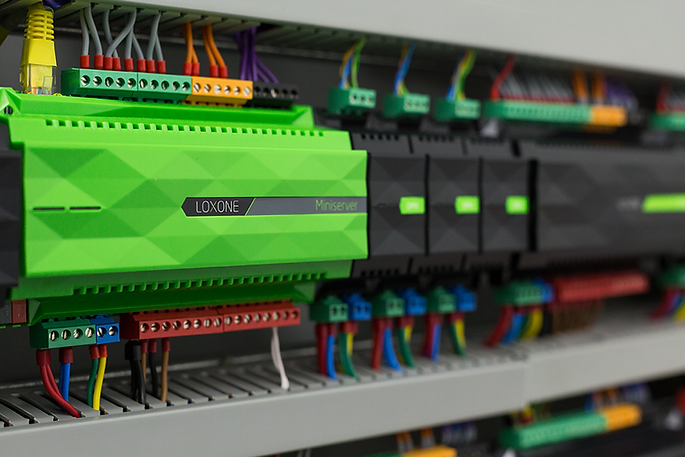
Loxone is a home automation system that allows you to control and automate various devices in your home, such as lights, heating, and appliances.
If you want to receive spot market prices from a MySQL database on your server, you would need to set up a connection between Loxone and the MySQL database. This can be done by using the Loxone API to retrieve the data from the MySQL database and then use the data to control or trigger certain actions in the Loxone system.
One way to accomplish this would be to write a script (e.g. in Python) that retrieves the spot market prices from the MySQL database and sends the data to Loxone using its API. This script could be scheduled to run at regular intervals, so that Loxone always has the most up-to-date spot market prices.
Additionally, you could use a middleware solution like Node-RED to connect the Loxone and the database and make the data available for Loxone to use it.
It's important to note that you would need to have the appropriate credentials and permissions to access the MySQL database, and that you would need to have a good understanding of the Loxone API and how to work with databases in order to set this up.
Loxone has a software modul, spotmarketmanager. This recieves the ENTSO-E data of all ENSTO-E members. What does the the spotpricemanager do for my business?
The Spot Market Manager module in Loxone is a software module that allows you to access real-time spot market prices for electricity from the European Network of Transmission System Operators for Electricity (ENTSO-E). It allows you to monitor the spot market prices of all ENTSO-E member countries in real-time, and use that data to make informed decisions about energy consumption and management in your business.
With the Spot Market Manager, you could use the spot market prices data to:
Automatically adjust energy consumption in your business to take advantage of low-price periods
Schedule energy-intensive tasks or processes to run during low-price periods
Optimize energy storage and management systems to take advantage of price fluctuations
Monitor the prices of different countries to identify patterns and trends that can inform future energy purchasing decisions
By having real-time access to spot market prices, you can make more informed decisions about energy consumption and management, which can help you to reduce costs and increase efficiency in your business. It's worth noting that the ability to take actions based on the ENTSO-E data is dependent on the specific configuration of the Loxone system and the customer's setup.
AL = '10YAL-KESH-----5', 'Albania, OST BZ / CA / MBA', 'Europe/Tirane',
AT = '10YAT-APG------L', 'Austria, APG BZ / CA / MBA', 'Europe/Vienna',
BY = '10Y1001A1001A51S', 'Belarus BZ / CA / MBA', 'Europe/Minsk',
BE = '10YBE----------2', 'Belgium, Elia BZ / CA / MBA', 'Europe/Brussels',
BA = '10YBA-JPCC-----D', 'Bosnia Herzegovina, NOS BiH BZ / CA / MBA', 'Europe/Sarajevo',
BG = '10YCA-BULGARIA-R', 'Bulgaria, ESO BZ / CA / MBA', 'Europe/Sofia',
CZ_DE_SK = '10YDOM-CZ-DE-SKK', 'BZ CZ+DE+SK BZ / BZA', 'Europe/Prague',
HR = '10YHR-HEP------M', 'Croatia, HOPS BZ / CA / MBA', 'Europe/Zagreb',
CWE = '10YDOM-REGION-1V', 'CWE Region', 'Europe/Brussels',
CY = '10YCY-1001A0003J', 'Cyprus, Cyprus TSO BZ / CA / MBA', 'Asia/Nicosia',
CZ = '10YCZ-CEPS-----N', 'Czech Republic, CEPS BZ / CA/ MBA', 'Europe/Prague',
DE_LU = '10Y1001A1001A82H', 'DE-LU BZ / MBA', 'Europe/Berlin',
DK = '10Y1001A1001A65H', 'Denmark', 'Europe/Copenhagen',
EE = '10Y1001A1001A39I', 'Estonia, Elering BZ / CA / MBA', 'Europe/Tallinn',
FI = '10YFI-1--------U', 'Finland, Fingrid BZ / CA / MBA', 'Europe/Helsinki',
MK = '10YMK-MEPSO----8', 'Former Yugoslav Republic of Macedonia, MEPSO BZ / CA / MBA', 'Europe/Skopje',
FR = '10YFR-RTE------C', 'France, RTE BZ / CA / MBA', 'Europe/Paris',
GR = '10YGR-HTSO-----Y', 'Greece, IPTO BZ / CA/ MBA', 'Europe/Athens',
HU = '10YHU-MAVIR----U', 'Hungary, MAVIR CA / BZ / MBA', 'Europe/Budapest',
IS = 'IS', 'Iceland', 'Atlantic/Reykjavik',
IE_SEM = '10Y1001A1001A59C', 'Ireland (SEM) BZ / MBA', 'Europe/Dublin',
IE = '10YIE-1001A00010', 'Ireland, EirGrid CA', 'Europe/Dublin',
IT = '10YIT-GRTN-----B', 'Italy, IT CA / MBA', 'Europe/Rome',
IT_GR = '10Y1001A1001A66F', 'IT-GR BZ', 'Europe/Rome',
IT_MACRO_NORTH = '10Y1001A1001A84D', 'IT-MACROZONE NORTH MBA', 'Europe/Rome',
IT_SUD = '10Y1001A1001A788', 'IT-South BZ', 'Europe/Rome',
RU_KGD = '10Y1001A1001A50U', 'Kaliningrad BZ / CA / MBA', 'Europe/Kaliningrad',
LV = '10YLV-1001A00074', 'Latvia, AST BZ / CA / MBA', 'Europe/Riga',
LT = '10YLT-1001A0008Q', 'Lithuania, Litgrid BZ / CA / MBA', 'Europe/Vilnius',
LU = '10YLU-CEGEDEL-NQ', 'Luxembourg, CREOS CA', 'Europe/Luxembourg',
MT = '10Y1001A1001A93C', 'Malta, Malta BZ / CA / MBA', 'Europe/Malta',
ME = '10YCS-CG-TSO---S', 'Montenegro, CGES BZ / CA / MBA', 'Europe/Podgorica',
GB = '10YGB----------A', 'National Grid BZ / CA/ MBA', 'Europe/London',
UK = '10Y1001A1001A92E', 'United Kingdom', 'Europe/London',
NL = '10YNL----------L', 'Netherlands, TenneT NL BZ / CA/ MBA', 'Europe/Amsterdam',
NO = '10YNO-0--------C', 'Norway, Norway MBA, Stattnet CA', 'Europe/Oslo',
PL_CZ = '10YDOM-1001A082L', 'PL-CZ BZA / CA', 'Europe/Warsaw',
PL = '10YPL-AREA-----S', 'Poland, PSE SA BZ / BZA / CA / MBA', 'Europe/Warsaw',
PT = '10YPT-REN------W', 'Portugal, REN BZ / CA / MBA', 'Europe/Lisbon',
MD = '10Y1001A1001A990', 'Republic of Moldova, Moldelectica BZ/CA/MBA', 'Europe/Chisinau',
RO = '10YRO-TEL------P', 'Romania, Transelectrica BZ / CA/ MBA', 'Europe/Bucharest',
RU = '10Y1001A1001A49F', 'Russia BZ / CA / MBA', 'Europe/Moscow',
SE_1 = '10Y1001A1001A44P', 'SE1 BZ / MBA', 'Europe/Stockholm',
SE_2 = '10Y1001A1001A45N', 'SE2 BZ / MBA', 'Europe/Stockholm',
SE_3 = '10Y1001A1001A46L', 'SE3 BZ / MBA', 'Europe/Stockholm',
SE_4 = '10Y1001A1001A47J', 'SE4 BZ / MBA', 'Europe/Stockholm',
RS = '10YCS-SERBIATSOV', 'Serbia, EMS BZ / CA / MBA', 'Europe/Belgrade',
SK = '10YSK-SEPS-----K', 'Slovakia, SEPS BZ / CA / MBA', 'Europe/Bratislava',
SI = '10YSI-ELES-----O', 'Slovenia, ELES BZ / CA / MBA', 'Europe/Ljubljana',
GB_NIR = '10Y1001A1001A016', 'Northern Ireland, SONI CA', 'Europe/Belfast',
ES = '10YES-REE------0', 'Spain, REE BZ / CA / MBA', 'Europe/Madrid',
SE = '10YSE-1--------K', 'Sweden, Sweden MBA, SvK CA', 'Europe/Stockholm',
CH = '10YCH-SWISSGRIDZ', 'Switzerland, Swissgrid BZ / CA / MBA', 'Europe/Zurich',
TR = '10YTR-TEIAS----W', 'Turkey BZ / CA / MBA', 'Europe/Istanbul',
UA = '10Y1001C--00003F', 'Ukraine, Ukraine BZ, MBA', 'Europe/Kiev',
UA_DOBTPP = '10Y1001A1001A869', 'Ukraine-DobTPP CTA', 'Europe/Kiev',
UA_BEI = '10YUA-WEPS-----0', 'Ukraine BEI CTA', 'Europe/Kiev',
UA_IPS = '10Y1001C--000182', 'Ukraine IPS CTA', 'Europe/Kiev',
XK = '10Y1001C--00100H', 'Kosovo/ XK CA / XK BZN', 'Europe/Rome'
Loxone und der Spotpreis: So kommt der Börsenstrompreis in den Miniserver
Der Spotpreis ist das Ergebnis der Day-Ahead-Auktion an der Strombörse: Für jede Lieferstunde des Folgetags wird ein Preis ermittelt, in Deutschland inzwischen zusätzlich in viertelstündlichen Produkten. Angegeben wird er in €/MWh — teile durch 10, dann hast du ct/kWh (100 €/MWh = 10 ct/kWh). Wichtig für deine Logik im Miniserver: Dieser Wert ist nur der Beschaffungsanteil. Netzentgelte, Messstellenbetrieb, Konzessionsabgabe, Stromsteuer und Umsatzsteuer kommen darauf und sind — mit Ausnahme zeitvariabler Netzentgelte — über den Tag konstant. Steuerst du also nach dem reinen Börsenpreis, steuerst du nach dem einzigen Bestandteil, der sich stündlich ändert. Das ist richtig für die Reihenfolge der Stunden, aber falsch, wenn du im Display den „Strompreis" anzeigen willst: Dafür musst du deine Vertragsaufschläge und die Steuern im Miniserver aufaddieren. Und: Auf deiner Rechnung landet der Spotpreis nur, wenn du einen dynamischen Tarif hast und der Zählpunkt viertelstündlich gemessen wird. Ohne dynamischen Vertrag ist die Spotpreis-Steuerung reine Kosmetik — außer du optimierst damit deinen PV-Eigenverbrauch.
Weg 1 — Pull: Du legst einen Virtuellen HTTP-Eingang an, der die URL deiner Preisquelle abruft, und ziehst mit der Befehlserkennung den gewünschten Wert aus der Antwort. Das funktioniert gut für genau eine Zahl (den Preis der laufenden Stunde), wird aber unhandlich, sobald du 24 Stunden- oder 96 Viertelstundenwerte aus einer JSON-Antwort parsen willst — dafür ist die Befehlserkennung nicht gebaut. Weg 2 — Push: Ein Skript (Python, Node-RED, Shell) oder eine Datenbank auf deinem eigenen Server holt die Kurve einmal täglich, rechnet sie in ct/kWh um und schreibt die Ergebnisse per HTTP in Virtuelle Eingänge des Miniservers — Aufruf-Muster: http://<user>:<pass>@<miniserver>/dev/sps/io/<Name-des-Eingangs>/<Wert>. Weg 2 ist der stabilere: Die ganze Rechnerei (Umrechnung, Aufschläge, Ranking der Stunden) passiert außerhalb des Miniservers, und du schiebst nur noch wenige fertige Größen hinein. Praktisch reichen meist drei: aktueller Preis, Rang der laufenden Stunde innerhalb der nächsten 24 Stunden, und ein Freigabe-Merker (0/1). Genau dieses Muster nutzt auch die MySQL-Anbindung, die weiter oben auf dieser Seite beschrieben ist.
Eine feste Preisschwelle („schalte unter X ct") ist der häufigste Anfängerfehler: An teuren Tagen läuft dann gar nichts, an billigen alles gleichzeitig. Robuster ist die Rangfolge — sortiere die kommenden Stunden nach Preis und gib dem Verbraucher die n günstigsten frei, wobei n aus dem tatsächlichen Bedarf kommt (Warmwasser-Ladung, Speicher-Ladung, Wallbox-Energiemenge geteilt durch Ladeleistung). Drei Dinge gehören zwingend in die Loxone-Logik: erstens eine Mindestlaufzeit bzw. Hysterese, damit ein Verdichter nicht im Viertelstundentakt taktet; zweitens harte Komfortgrenzen, die den Preis überstimmen (Puffertemperatur zu niedrig → einschalten, egal was der Preis sagt); drittens ein definiertes Verhalten bei Datenausfall. Wenn dein Skript morgen nicht liefert, steht im Virtuellen Eingang noch der Wert von gestern — deshalb einen Zeitstempel mitschieben und bei überaltertem Wert auf einen neutralen Standardfahrplan zurückfallen, statt auf eine Zahl zu regeln, die niemand mehr aktualisiert.
Wann kann Loxone die Spotpreise für den nächsten Tag abrufen?
Erst nach der Day-Ahead-Auktion. Die Gebotsfrist endet mittags, die Ergebnisse für alle Stunden des Folgetags stehen anschließend fest und werden am frühen Nachmittag veröffentlicht — den exakten Zeitpunkt und die Aktualisierungsfrequenz musst du bei deiner konkreten Datenquelle nachsehen, sie unterscheiden sich. Plane deinen Abruf deshalb nicht auf Mitternacht, sondern auf den Nachmittag, und wiederhole ihn ein- bis zweimal für den Fall, dass die Quelle beim ersten Versuch noch nichts hat. Bis zum nächsten Abruf arbeitet der Miniserver mit der gespeicherten Kurve weiter.
Brauche ich einen dynamischen Stromtarif, damit sich die Spotpreis-Steuerung lohnt?
Für eine Ersparnis auf der Stromrechnung: ja. Nur wenn dein Liefervertrag den Arbeitspreis stündlich bzw. viertelstündlich an die Börse koppelt, wirkt das Verschieben von Lasten überhaupt auf den Rechnungsbetrag — und dafür braucht der Zählpunkt eine viertelstündliche Messung, in der Regel ein intelligentes Messsystem. Ohne dynamischen Tarif zahlst du für jede kWh denselben Preis, egal wann sie fließt; die Spotpreis-Logik ändert dann nichts an den Kosten. Sinnvoll bleibt sie in diesem Fall nur als Eigenverbrauchs- oder Netzentlastungs-Steuerung — das ist aber eine andere Zielgröße als der Börsenpreis.
Comments